Choosing the right tax software can make filing your federal tax return faster, easier, and potentially less expensive. Three of the most popular tax preparation platforms in the United States are TurboTax, FreeTaxUSA, and H&R Block. Each offers online filing, tax guidance, and electronic filing, but they differ in pricing, features, customer support, and the types of taxpayers they serve best.
So, which one should you choose in 2026?
The answer depends on your tax situation, budget, and the level of guidance you need. In this comparison, we’ll break down the features, pricing, pros, cons, and ideal users for each platform to help you make an informed decision.
Quick Comparison
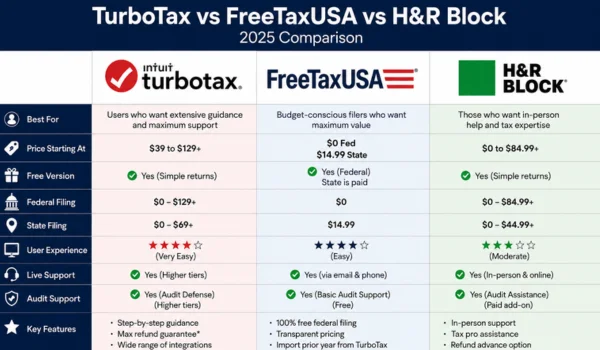
| Feature | TurboTax | FreeTaxUSA | H&R Block |
| Best For | Beginners & complex returns | Budget-conscious filers | Online filing with optional in-person support |
| Federal Filing | ✔ | ✔ | ✔ |
| State Filing | Available | Available | Available |
| Step-by-Step Guidance | Excellent | Good | Very Good |
| Free Filing Option | Available for eligible simple returns | Federal filing is free for most returns; state filing generally has a fee | Available for eligible simple returns |
| Self-Employment Support | ✔ | ✔ | ✔ |
| Investment Income Support | ✔ | ✔ | ✔ |
| Mobile App | ✔ | ✔ | ✔ |
| Live Tax Expert Option | ✔ | ✔ (selected services) | ✔ |
| In-Person Tax Offices | ✖ | ✖ | ✔ |
TurboTax Overview
TurboTax is developed by Intuit and is one of the most widely recognized tax software platforms in the U.S.
It focuses on making tax filing simple through an interview-style process that asks straightforward questions and automatically prepares the required tax forms.
Key Features
- Beginner-friendly interface
- Automatic import of many tax documents
- Step-by-step guidance
- Support for investments and cryptocurrency
- Self-employed tax filing
- Rental property reporting
- Mobile app
- Optional expert assistance
Pros
- Easy to use
- Excellent guidance for first-time filers
- Supports a wide range of tax situations
- Strong document import features
- Helpful error checking before filing
Cons
- Often more expensive than competitors
- Higher-tier plans may be required for complex returns
- State filing may involve additional fees
Best For
- First-time taxpayers
- Families
- Homeowners
- Investors
- Freelancers
- Small business owners
- Users who prefer a guided filing experience
FreeTaxUSA Overview
FreeTaxUSA is known for offering affordable tax filing while still supporting many tax situations.
Unlike some competitors, it allows most taxpayers to file a federal return at no cost, with a relatively low fee for state returns.
Key Features
- Free federal filing for most tax returns
- Affordable state filing
- Supports self-employment income
- Investment reporting
- Itemized deductions
- Prior-year return access
- Optional professional support
Pros
- Excellent value for the price
- Supports many complex tax situations
- Straightforward interface
- Lower overall cost than many competitors
Cons
- Fewer automatic document import options
- Interface is simpler and less polished
- Fewer built-in educational prompts than TurboTax
Best For
- Budget-conscious taxpayers
- Freelancers
- Self-employed individuals
- Experienced tax filers
- Families looking to reduce filing costs
H&R Block Overview
H&R Block combines online tax software with the option to receive help from tax professionals at physical office locations across the United States.
This hybrid approach appeals to taxpayers who may want both digital convenience and in-person assistance.
Key Features
- Online tax filing
- Mobile app
- Optional in-person tax preparation
- Document upload
- Tax expert assistance
- Investment reporting
- Self-employed filing
Pros
- Access to local tax professionals
- Easy-to-use online software
- Good customer support options
- Suitable for a variety of tax situations
Cons
- Paid plans may be more expensive than budget-focused competitors
- Some advanced features require higher-tier products
- State filing fees may apply
Best For
- Taxpayers who may want face-to-face assistance
- Individuals with moderate to complex tax returns
- Users who value multiple support options
Feature Comparison
Ease of Use
| Software | Rating |
| TurboTax | Excellent |
| H&R Block | Very Good |
| FreeTaxUSA | Good |
TurboTax offers the most beginner-friendly experience with detailed explanations throughout the filing process.
Pricing
| Software | Overall Cost |
| FreeTaxUSA | Lowest |
| H&R Block | Moderate |
| TurboTax | Generally Highest |
If keeping costs low is your priority, FreeTaxUSA is often the most affordable choice.
Self-Employed Tax Filing
All three platforms support self-employed taxpayers.
They can generally handle:
- Freelance income
- Independent contractor income
- Small business income
- Business expenses
- Estimated tax calculations
TurboTax provides the most guided experience, while FreeTaxUSA offers a lower-cost alternative.
Investment Support
All three platforms support reporting for:
- Stocks
- Mutual funds
- ETFs
- Capital gains and losses
- Cryptocurrency transactions
- Dividend income
The overall experience may vary depending on the complexity of your investments and the software version selected.
Customer Support
| Software | Support Options |
| TurboTax | Online help, live experts (selected plans) |
| FreeTaxUSA | Email support and optional professional assistance |
| H&R Block | Online support plus in-person office assistance |
H&R Block stands out for users who prefer access to physical tax offices.
Which Software Is Best for Different Taxpayers?
Best for Beginners
Winner: TurboTax
Its interview-style format, built-in explanations, and automatic guidance make it one of the easiest tax software options for new filers.
Best Budget Option
Winner: FreeTaxUSA
It offers free federal filing for most returns and low-cost state filing while supporting many tax situations.
Best for In-Person Help
Winner: H&R Block
If you’d like the option to meet with a tax professional, H&R Block provides access to physical office locations in addition to online filing.
Best for Self-Employed Individuals
Winner: TurboTax
TurboTax provides detailed guidance for freelancers, contractors, and small business owners.
FreeTaxUSA is a strong lower-cost alternative for users comfortable with less hand-holding.
Best for Investors
Winner: TurboTax
TurboTax generally provides a polished experience for reporting investments, capital gains, and cryptocurrency transactions.
Both H&R Block and FreeTaxUSA also support investment reporting, making them suitable alternatives depending on your budget and support preferences.
Pros and Cons at a Glance
| Software | Biggest Strength | Biggest Drawback |
| TurboTax | Excellent guidance and ease of use | Higher cost |
| FreeTaxUSA | Affordable pricing | Fewer automation features |
| H&R Block | In-person support available | Some advanced features require paid plans |
Which Tax Software Should You Choose?
Choose TurboTax if you:
- Want the easiest filing experience.
- Prefer step-by-step guidance.
- Have investments or self-employment income.
- Don’t mind paying more for convenience.
Choose FreeTaxUSA if you:
- Want to minimize filing costs.
- Have a straightforward or moderately complex return.
- Are comfortable entering some information manually.
- Need support for self-employment without paying premium software prices.
Choose H&R Block if you:
- Want online filing with the option for in-person help.
- Prefer access to tax professionals at local offices.
- Have a moderate or complex return and value additional support options.
Frequently Asked Questions
Which tax software is the easiest to use?
TurboTax is widely considered one of the easiest tax software platforms because of its guided interview process and clear explanations.
Which software is the cheapest?
FreeTaxUSA is generally the most affordable option, offering free federal filing for most tax returns and relatively low state filing fees.
Is H&R Block better than TurboTax?
Neither is universally better. TurboTax is often preferred for its user-friendly experience, while H&R Block stands out for offering both online filing and access to in-person tax professionals.
Can all three handle self-employed taxes?
Yes. TurboTax, FreeTaxUSA, and H&R Block all support self-employed taxpayers, including freelancers, contractors, and many small business owners.
Which software is best for first-time filers?
TurboTax is often the best choice for first-time filers because it provides detailed guidance throughout the filing process.
Final Verdict
All three tax software platforms are capable of preparing and filing federal tax returns, but the right choice depends on your priorities.
- TurboTax is the best option if you value an intuitive interface, detailed guidance, and strong support for complex tax situations.
- FreeTaxUSA offers outstanding value for taxpayers looking to keep filing costs low while still handling a wide range of tax scenarios.
- H&R Block is an excellent middle ground for users who appreciate online convenience but also want the flexibility of in-person professional assistance when needed.
Before selecting a platform, consider the complexity of your tax return, the level of support you want, and your budget. Choosing software that matches your specific needs can make tax filing simpler, faster, and less stressful.