TurboTax Free vs Deluxe vs Premier vs Self-Employed: Which Version Should You Choose? (2026 Guide)

Choosing the right version of TurboTax can save you both time and money during tax season. While every edition helps you prepare and file your federal tax return, each plan is designed for different tax situations.
If you have a simple W-2 job, the Free Edition may be enough. However, homeowners, investors, freelancers, and small business owners often need more advanced features available in the paid versions.
This guide compares TurboTax Free, Deluxe, Premier, and Self-Employed (Premium) to help you decide which version best fits your tax needs in 2026.
Quick Comparison
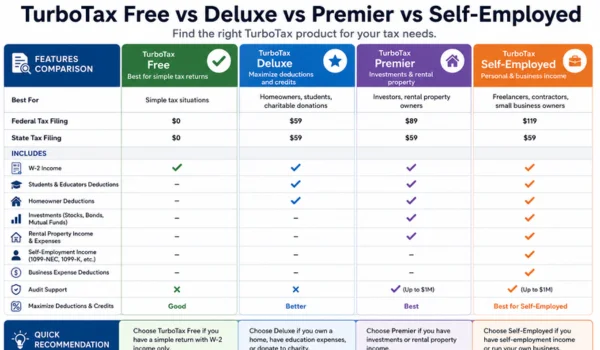
| Feature | Free | Deluxe | Premier | Self-Employed (Premium) |
| Best For | Simple tax returns | Homeowners & families | Investors & rental property owners | Freelancers & business owners |
| Federal Tax Filing | ✔ | ✔ | ✔ | ✔ |
| State Tax Filing | May cost extra | Usually extra | Usually extra | Usually extra |
| W-2 Income | ✔ | ✔ | ✔ | ✔ |
| Standard Deduction | ✔ | ✔ | ✔ | ✔ |
| Itemized Deductions | Limited | ✔ | ✔ | ✔ |
| Investment Income | Limited | Limited | ✔ | ✔ |
| Rental Property | ✖ | ✖ | ✔ | ✔ |
| Self-Employment Income | ✖ | Limited | Limited | ✔ |
| Business Expense Guidance | ✖ | ✖ | Limited | ✔ |
| Expert Assistance | Optional | Optional | Optional | Optional |
TurboTax Free Edition
Best For
The Free Edition is designed for taxpayers with simple tax situations.
It may be suitable if you:
- Have only W-2 income
- Claim the standard deduction
- Have no business income
- Have few or no investments
- Have a straightforward tax return
Main Features
- Federal tax filing
- Step-by-step interview
- Automatic tax calculations
- Basic tax credits (when supported)
- Electronic filing
Pros
- No cost for many simple returns
- Easy to use
- Fast filing process
- Good for first-time filers
Cons
- Not suitable for complex tax returns
- Limited support for investments and business income
- Advanced deductions are generally not included
TurboTax Deluxe
Best For
Deluxe is a good option for taxpayers who want help finding deductions and may benefit from itemizing.
It is commonly chosen by:
- Homeowners
- Families
- Individuals making charitable donations
- Taxpayers with deductible expenses
Additional Features
Compared with the Free Edition, Deluxe generally offers:
- Guidance for itemized deductions
- Help identifying eligible tax deductions
- Charitable donation support
- Mortgage-related deduction guidance
- Additional tax-saving suggestions
Pros
- Helps maximize eligible deductions
- Easy for homeowners
- Good balance between price and features
Cons
- Does not focus on investment or business tax situations
- Costs more than the Free Edition
TurboTax Premier
Best For
Premier is designed for taxpayers with investment income or rental property.
It may be appropriate if you have:
- Stock sales
- Mutual funds
- ETFs
- Cryptocurrency transactions
- Rental properties
- Capital gains and losses
Additional Features
Premier generally includes:
- Investment income reporting
- Capital gains calculations
- Rental property income support
- Cryptocurrency transaction reporting
- Additional investment guidance
Pros
- Strong investment reporting tools
- Helpful for landlords
- Handles more complex tax situations
Cons
- Higher cost than Deluxe
- May include features unnecessary for taxpayers without investments
TurboTax Self-Employed (Premium)
Best For
This version is designed for people who earn income from self-employment or operate a small business.
Common users include:
- Freelancers
- Independent contractors
- Consultants
- Gig workers
- Sole proprietors
- Online business owners
- Content creators
Additional Features
In addition to Premier features, this edition typically offers:
- Self-employment income reporting
- Business expense guidance
- Home office deduction guidance
- Vehicle expense support
- Industry-specific deduction suggestions
- Estimated quarterly tax guidance
Pros
- Built for business owners
- Helps organize deductible expenses
- Suitable for many 1099 workers
- Supports more complex business tax situations
Cons
- Usually the most expensive consumer version
- Extra features may not be necessary for traditional employees
Which TurboTax Version Should You Choose?
Choose Free Edition If
- You only receive W-2 income.
- You claim the standard deduction.
- You have a simple tax return.
- You don’t own investments or a business.
Choose Deluxe If
- You own a home.
- You may itemize deductions.
- You make charitable donations.
- You want additional help finding tax deductions.
Choose Premier If
- You actively invest.
- You sold stocks or cryptocurrency.
- You own rental property.
- You have capital gains or investment income.
Choose Self-Employed (Premium) If
- You receive Form 1099 income.
- You own a small business.
- You’re a freelancer or contractor.
- You need guidance on business deductions and estimated taxes.
Pricing Comparison
Pricing varies based on:
- The version you choose
- Whether you file a state return
- Optional expert assistance
- Additional services selected
TurboTax pricing may change during the filing season, so review the latest pricing before purchasing or filing.
Can You Upgrade Later?
Yes.
Many users start with the Free Edition and upgrade if they discover their tax situation requires additional features.
For example:
- You begin entering investment income.
- You report self-employment earnings.
- You decide to itemize deductions.
TurboTax generally allows upgrades during the preparation process if your return requires a higher-tier plan.
TurboTax Versions at a Glance
| Situation | Recommended Version |
| Basic W-2 employee | Free |
| Homeowner | Deluxe |
| Charitable donations | Deluxe |
| Stock investor | Premier |
| Cryptocurrency investor | Premier |
| Rental property owner | Premier |
| Freelancer | Self-Employed (Premium) |
| Independent contractor | Self-Employed (Premium) |
| Small business owner | Self-Employed (Premium) |
Pros and Cons of Upgrading
Benefits
- More tax guidance
- Support for complex returns
- Additional deduction assistance
- Better investment reporting
- Business expense support
- Rental property reporting
Drawbacks
- Higher cost
- Some users may pay for features they don’t need
- State filing fees may still apply depending on the plan
Frequently Asked Questions
Is TurboTax Free really free?
The Free Edition is available for many simple tax returns. If your return includes certain forms or more complex tax situations, you may need to upgrade to a paid version.
Can I switch versions after I start?
Yes. If you begin with one edition and later need additional features, you can usually upgrade while preparing your return.
Which version is best for freelancers?
The Self-Employed (Premium) version is generally the best choice for freelancers, consultants, independent contractors, and small business owners because it includes guidance for business income and eligible deductions.
Do investors need Premier?
Premier is designed for taxpayers who need to report investment income, capital gains, rental property income, or cryptocurrency transactions.
Is Deluxe enough for homeowners?
For many homeowners who primarily want help with deductions and itemizing, Deluxe may be sufficient. Taxpayers with investments or self-employment income may need a higher-tier version.
Final Verdict
Each TurboTax edition is designed for a different type of taxpayer, so the best choice depends on the complexity of your tax situation.
- Free Edition is ideal for simple W-2 tax returns.
- Deluxe is a solid choice for homeowners and taxpayers looking to maximize eligible deductions.
- Premier is best suited for investors, landlords, and individuals with capital gains or cryptocurrency transactions.
- Self-Employed (Premium) is the most comprehensive option for freelancers, independent contractors, gig workers, and small business owners who need support for business income and deductions.
Choosing the version that matches your tax needs can help you avoid paying for unnecessary features while ensuring you have the tools required to prepare an accurate return.