Filing your federal tax return doesn’t have to be complicated. TurboTax is one of the most widely used tax preparation software programs in the United States, offering a guided, interview-style process that helps individuals prepare and file their federal income tax returns online.
Whether you’re filing your taxes for the first time or switching from another tax software, TurboTax walks you through each step—from creating an account to submitting your return electronically.
This guide explains how to file your federal taxes using TurboTax, what documents you’ll need, and tips to help make the filing process smoother.
Before You Start
Gather all the necessary documents before beginning your tax return. Having everything ready can save time and reduce errors.
You may need:
- Social Security Number (SSN) or Individual Taxpayer Identification Number (ITIN)
- Government-issued photo ID (if required for identity verification)
- W-2 forms from your employer
- Form 1099 (if you’re self-employed, freelance, or have investment income)
- Bank account and routing numbers (for direct deposit or payment)
- Last year’s tax return (optional but helpful)
- Records of deductible expenses
- Information about dependents
- Documents related to tax credits or deductions you plan to claim
Step 1: Create or Sign In to Your TurboTax Account
Visit the TurboTax website or open the mobile app.
- Create a new account if you’re a first-time user.
- Sign in if you’ve used TurboTax in previous years.
Returning users may be able to import information from prior tax returns, making the process faster.
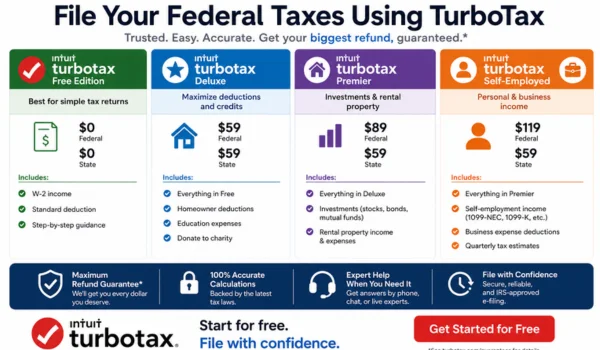
Step 2: Choose the Right TurboTax Version
TurboTax offers different versions based on your tax situation.
Choose the version that best matches your needs:
- Free Edition – Simple tax returns
- Deluxe – Homeowners and taxpayers claiming additional deductions
- Premier – Investors and rental property owners
- Self-Employed (Premium) – Freelancers, contractors, and small business owners
Selecting the appropriate version helps ensure you have access to the features required for your return.
Step 3: Enter Your Personal Information
TurboTax will ask for basic details, including:
- Full legal name
- Date of birth
- Social Security Number
- Filing status
- Address
- Occupation
- Information about your spouse (if filing jointly)
- Information about dependents
Make sure all information matches your official records to avoid processing delays.
Step 4: Enter Your Income
Next, report all sources of taxable income.
Common income types include:
- W-2 wages
- Self-employment income
- Freelance income
- Interest income
- Dividend income
- Investment income
- Retirement distributions
- Unemployment compensation (if applicable)
- Other taxable income
TurboTax may allow you to import certain tax forms directly from participating employers or financial institutions, reducing manual data entry.
Step 5: Report Deductions
TurboTax will ask questions to determine whether you qualify for deductions.
Common deductions include:
- Standard deduction
- Mortgage interest
- Charitable donations
- Student loan interest
- Health Savings Account (HSA) contributions
- Traditional IRA contributions
- Self-employed business expenses (if applicable)
The software helps identify deductions based on the information you enter.
Step 6: Claim Eligible Tax Credits
TurboTax also checks whether you qualify for tax credits.
Depending on your situation, you may be eligible for credits such as:
- Child Tax Credit
- Earned Income Tax Credit (EITC)
- American Opportunity Credit
- Lifetime Learning Credit
- Child and Dependent Care Credit
- Residential clean energy credits
Tax credits reduce the amount of tax you owe and, in some cases, may increase your refund.
Step 7: Review Your Tax Return
Before filing, TurboTax performs an automatic review to identify common issues.
The software checks for:
- Missing information
- Mathematical errors
- Incomplete forms
- Inconsistent entries
- Potential filing mistakes
If any issues are found, TurboTax will usually explain them and guide you through making corrections.
Step 8: Review Your Refund or Tax Due
Once your return is complete, TurboTax provides an estimate showing whether you:
- Are expected to receive a federal tax refund, or
- Need to pay additional federal income tax
Review the summary carefully to ensure everything looks accurate before filing.
Step 9: Choose Your Refund or Payment Method
If you’re receiving a refund, you can typically choose between:
- Direct deposit into your bank account
- Paper check by mail (if available)
If you owe taxes, payment options may include:
- Direct bank payment
- Debit or credit card
- Electronic payment through the IRS
- Other IRS-approved payment methods
Choose the method that best fits your financial situation.
Step 10: Electronically File Your Federal Tax Return
After reviewing your information, submit your return electronically (e-file).
TurboTax generally guides you through:
- Identity verification
- Electronic signature
- Final review
- Submission
Once your return is accepted for transmission, you’ll receive a confirmation that it has been successfully submitted.
Keep this confirmation for your records.
Step 11: Track Your Refund
After your return has been accepted, you can monitor the progress of your refund.
Refund status typically goes through three stages:
- Return received
- Refund approved
- Refund sent
Processing times vary depending on your filing method, the accuracy of your return, and IRS processing.
Common Mistakes to Avoid
To help prevent delays or errors, avoid these common mistakes:
Entering Incorrect Personal Information
Double-check names, Social Security Numbers, and dates of birth.
Forgetting Income
Report all taxable income, including:
- W-2 wages
- 1099 income
- Investment earnings
- Side business income
Missing Tax Documents
Wait until you’ve received all required tax forms before filing.
Choosing the Wrong Filing Status
Your filing status affects your tax calculation and eligibility for certain deductions and credits.
Skipping the Final Review
Always review your return carefully before submitting it electronically.
Tips for a Faster Filing Experience
- Gather all tax documents before you begin.
- Use direct deposit for refunds whenever possible.
- Keep copies of your tax records.
- Review imported information for accuracy.
- Update your personal information if it has changed.
- File before the deadline to avoid late-filing penalties if you owe tax.
Can You File State Taxes Too?
Yes. TurboTax also supports many state income tax returns.
If your state requires an income tax return, TurboTax will usually guide you through the state filing process after completing your federal return.
Keep in mind that state filing fees may apply depending on the version you use and your state’s requirements.
Frequently Asked Questions
Is TurboTax good for first-time tax filers?
Yes. TurboTax is designed with beginners in mind and provides step-by-step guidance throughout the filing process.
Can I file my federal taxes for free?
Some taxpayers with simple tax situations may qualify to use TurboTax Free Edition. More complex returns may require a paid version.
How long does it take to file with TurboTax?
The time depends on the complexity of your return. Simple returns may take less than an hour, while returns involving self-employment, investments, or multiple income sources generally take longer.
Can I file using my phone?
Yes. TurboTax offers a mobile app that allows eligible users to prepare and file their tax returns using a smartphone or tablet.
What if I make a mistake before filing?
If your return hasn’t been submitted yet, you can generally go back and correct any information before e-filing.
Final Thoughts
TurboTax makes filing your federal taxes more accessible by breaking the process into simple, guided steps. From entering your personal information and income to claiming deductions, reviewing your return, and submitting it electronically, the software is designed to simplify tax preparation for a wide range of taxpayers.
By gathering your documents in advance, choosing the right TurboTax version, and carefully reviewing your return before filing, you can complete your federal tax return with greater confidence and reduce the likelihood of delays or errors.